
There’s an interesting pattern across SMBs in Iowa: the server room still exists. You can hear it hum in the back office, in a closet, sometimes in a space that was never meant to house critical infrastructure in the first place.
This solution worked. Until it didn’t.
At some point, every business with on-site servers hits the same wall: rising costs, growing risk, and a creeping sense that this setup no longer matches how the business operates.
Until the last decade or so, on-prem server rooms were the norm. But things have shifted. On-prem infrastructure comes with more risks than benefits in most cases.
So let’s talk about colocation as a practical next step for Iowa SMBs. When does it make sense and for whom? Because there’s no such thing as a one-size-fits-all setup in critical infrastructure.
When It’s Time to Move to Colocation
You don’t need a dramatic failure to justify the shift from on-prem to data center colocation. Most companies move because the cost—and the risk—stop making sense.
Here’s when it makes sense to consider colocation:
1. Your “Server Room” Was Never Designed for Uptime
A converted office or storage room can’t replicate a purpose-built facility. Cooling is inconsistent, power redundancy is limited, and physical security is often an afterthought.
Network failures, cybersecurity issues, and network outages remain the leading causes of downtime, and many of these risks are amplified in non-specialized environments.
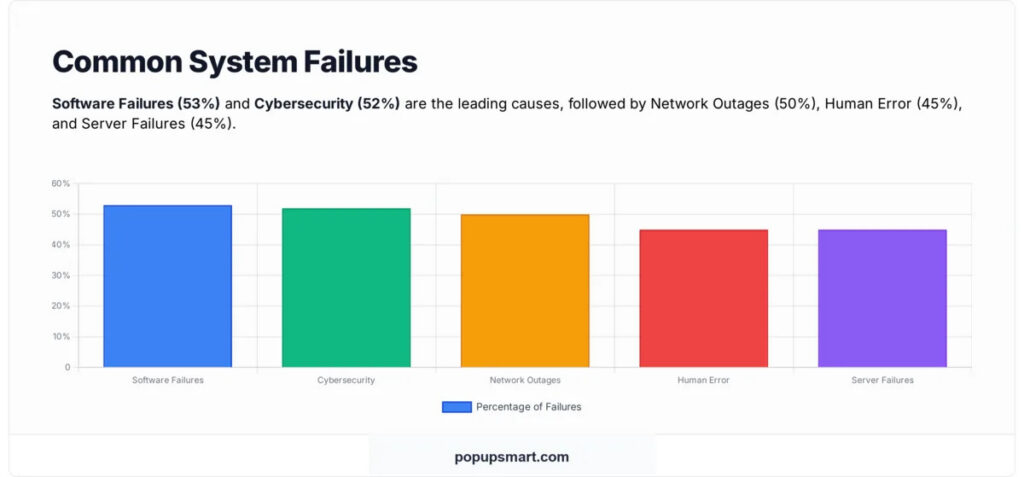
Moreover, if your infrastructure depends on a single HVAC unit or a basic uninterruptible power supply (UPS), you’re operating with thin margins.
2. Downtime Is Getting Expensive
Back when only a few areas of a business needed an internet connection to run, downtime was just inconvenient. But now it’s devastating and expensive as lost revenue piles up every second.
The cost of downtime can be anything from $5,600 to $22,000 per minute for an SMB. Even short outages disrupt operations, delay revenue, and erode trust. If your current setup can’t guarantee uptime, you’re carrying hidden costs that will show up sooner or later.
3. You’re Spending Too Much Time Managing Infrastructure
Server maintenance has a way of expanding. Patching, monitoring, hardware replacements, and troubleshooting all add up.
Most SMB teams don’t have dedicated infrastructure specialists because, honestly, there isn’t enough work to justify a full-time salary. That means your IT resources are stretched thin, often reacting instead of planning.
This is where colocation changes the equation. You keep control of your hardware, but you offload the environment to experts who manage power, cooling, and physical security at scale.
4. Compliance and Security Requirements Are Tightening
Regulatory expectations are rising across industries, especially healthcare, finance, and manufacturing. In this landscape, on-site environments often struggle to keep up with physical security standards, access controls, and audit requirements.
Colocation facilities are built with these in mind from day one.
If you’re unsure what it should look like, learn how data centers support risk management.
5. Growth Is Creating Infrastructure Pressure
When your business grows, you not only get more revenue. You also get more data, more applications, more users, and more complexity.
At some point, your server room runs out of space, power, or cooling capacity. Expanding it often costs more than expected and still doesn’t deliver enterprise-grade resilience.
This is one of the clearest signals that it’s time to evaluate colocation.
Colocation Fits the Middle Ground
Cloud computing is still being hyped as the only option that meets today’s standards, but that couldn’t be further from the truth. On-premise is seen as an outdated solution while self-managed data centers are huge capital expenditures.
Colocation, on the other hand, sits in between these solutions—and that’s exactly why it works.
You keep ownership of your hardware and you gain access to a facility designed for uptime, redundancy, and security. It’s a strategic move for organizations that want control without carrying the full operational burden.
Moreover, it also aligns well with hybrid strategies, especially as edge computing becomes more relevant.
How to Move to Colocation Without Breaking Things
Moving infrastructure feels risky, but it doesn’t have to be chaotic. Here’s how to approach it with a clear plan.
1. Audit What You Actually Need to Move
Most companies don’t have a clean inventory of their IT infrastructure. Before you move anything, map it.
List your servers, applications, dependencies, storage needs, and network requirements. Identify what’s critical and what can tolerate downtime.
This step shapes everything that follows.
2. Define Your Goals
Colocation solves multiple problems: uptime, scalability, security, cost predictability, and more.
The truth is that you don’t need all of them equally, so make a list of priorities. Are you trying to reduce downtime? Support growth? Meet compliance requirements? Your priorities will determine what kind of facility and services you need and drive what questions to ask a potential data center provider.
3. Choose a Local Colocation Facility
There’s a strong case for keeping infrastructure close to where your business operates: lower latency, faster hands-on support, better alignment with regional compliance, and connectivity needs among the most obvious. Being members of the same local community also adds a layer of trust that’s nice to have with a data center that has mission-critical infrastructure.
4. Plan the Migration in Phases
You don’t have to get everything moved in a single day. In fact, a full cutover is not as efficient as it sounds.
Plan to move in stages. Start with non-critical systems so you can test connectivity, performance, and failover processes. Build the trust you need in your new space before migrating core workloads.
This approach will also help you schedule and minimize downtime. Your colocation partner should be very involved in this stage, so make sure you work with a data center that understands your IT requirements.
5. Align Your Data Strategy with the Move
Colocation is more than a location change. It’s also an opportunity to rethink how you manage data.
Start with these questions:
- What stays on physical servers?
- What moves to the cloud?
- How do you handle backups, replication, and disaster recovery?
These questions help you future-proof your data storage strategy and ensure this will be the last big move you need to make for a while.
Is Colocation Right for Your Iowa SMB?
Colocation data centers can play a role in most businesses’ data storage strategies—from storing backups to hosting all first-line critical applications. Get in touch with us and tell us a bit about your company and your current infrastructure. We’ll help you understand whether colocation is right for you.